
Unless a company qualifies for an exemption, California now requires that all companies with employees offer some sort of retirement plan.
Offering a Plan
While some companies have retirement plans in place, it is fair to say that a significant number of them do not. Companies have the option to find a plan in the open marketplace or if they prefer, California created the CalSavers Retirement Savings Program to expand access to retirement savings for workers whose employers do not offer their own workplace plan.
Under state law, most employers with at least one eligible W-2 employee must either enroll their workforce into CalSavers or formally certify that they already provide a tax-qualified retirement plan. This reporting requirement is central to the program’s structure and understanding it helps employers avoid penalties and ensure smooth compliance.
Which Plans Qualify
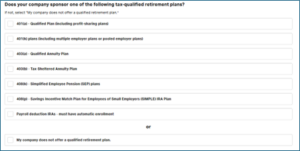
Qualified retirement plans include
- 401(a) – Qualified Plan (including profit-sharing plans and defined benefit plans)
- 401(k) plans (including multiple employer plans or pooled employer plans)
- 403(a) – Qualified Annuity Plan or 403(b) Tax-Sheltered Annuity Plan
- 408(k) – Simplified Employee Pension (SEP) plans
- 408(p) – Savings Incentive Match Plan for Employees of Small Employers (SIMPLE) IRA Plan
Reporting
Offering a plan is not enough. You must either sign up for CalSavers which notifies them you have offered a plan or register with CalSavers to let them know you are exempt by (1) offering a tax-qualified plan or (2) qualify for a general exemption. If you are the owner of a company and the only employee of said company, you are not required to register with or sign up for CalSavers.
If a business offers any of these, it is considered exempt from participating in CalSavers. However, exemption is not automatic. Employers must actively report their plan to the state through the CalSavers online portal.
The reporting process is straightforward. Employers begin by creating or accessing their CalSavers account and entering basic business information, including their Employer Identification Number (EIN). The system then guides them through a brief certification where they identify the type of retirement plan they offer and confirm that the plan is made available to all eligible employees. This certification is made under penalty of perjury, so accuracy is essential. Once submitted, the employer is marked as exempt and is not required to enroll employees in the CalSavers program.
Although reporting is typically a one-time task, employers may need to update their status if circumstances change. For example, if a company terminates its retirement plan, stops offering it to new employees, or switches to a different type of tax-qualified plan, it may need to notify CalSavers. The program may also issue periodic reminders requesting employers to confirm their continued exemption.
Failure to comply with the reporting requirement can lead to significant penalties. The state may assess a fine of $250 per eligible employee if the employer does not report or enroll employees after receiving official notice. Continued non-compliance can result in an additional $500 per employee, bringing the total potential penalty to $750 per worker. For businesses with larger staff, the fines can escalate quickly.
STEP-BY-STEP REPORTING INSTRUCTIONS
________________________________________
What you’ll need before you start
- Federal Employer Identification Number (FEIN/EIN)
- California payroll tax account number (EDD payroll account)
- CalSavers Access Code (sent to the primary contact on file with the EDD; you can request a new code if you don’t have it)
- Contact info for the person who will act as Account Manager (name, email, phone)
________________________
Step-by-step: How to report your tax-qualified plan (using the CalSavers website)
- Go to the Calsavers website
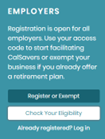
- Under EMPLOYERS click Register or Exempt to register or Check Your Eligibility for more information

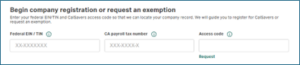
- Enter your FEIN/EIN, your CA EDD payroll tax ID number and the CalSavers Access Code from the notice you received. If you can’t find the access code, use the “Request Access Code” link to have it sent to your company via email

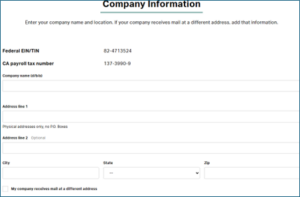
- Enter Company Information

- Exemption Check Identify the type of plan you offer (401(k), 403(b), SEP, SIMPLE, etc.) and certify that the plan is available to your eligible employees. The certification is made under penalty of perjury so be sure to be accurate

- Review your request
- Submit the exemption form. You should receive confirmation on screen and via email. Keep a copy of the confirmation for your records. (CalSavers periodically asks employers to reconfirm exemption status)
- If you are registering (not exempting), the portal will prompt you to add your employee roster within 30 days — either by manual entry or by uploading the Employee Information Template/CSV. CalSavers will then notify employees and start the 30-day opt-out window
- If circumstances change (you terminate or start offering a different plan), return to the portal to update your status so you remain compliant
_________________________
Tips & Troubleshooting
- If you are unable to locate your access code or get stuck, use the “Request Access Code” link or contact CalSavers Client Services for help
- Keep documentation (confirmation emails, screenshots) proving you certified an exemption — it’s your proof against any future notices
- If you receive a penalty notice from FTB, act quickly: the notices outline how to cure noncompliance and what information is needed to avoid additional fines
*this article was written December 15, 2025 for the purpose of providing general guidance only. Rules are subject to change. Consult your payroll provider and CalSavers regularly for updated information.